


|
Name |
Solid Explorer File Manager |
|---|---|
|
Google Play Link |
GET IT ON
Google Play
|
|
Category |
Productivity |
|
Developer |
NeatBytes |
| Last version | 3.6.2 |
|
Updated |
|
|
Compatible with |
Android 6.0+ |
What is Solid Explorer File Manager APK?
Solid Explorer is a mobile utility app built for Android devices, focused on file management and storage control. It works like a digital organizer for your phone, helping you handle documents, media files, downloads, and even cloud storage in one place. Instead of relying on basic built-in tools, it offers a more structured way to keep everything sorted and easy to find.
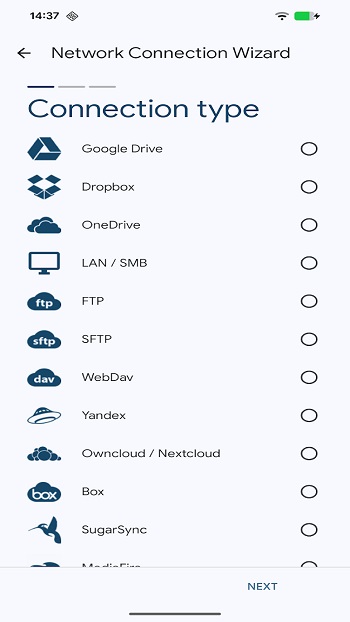
The main purpose of this app is to simplify how you manage files on your device. You can move, copy, delete, and organize data without getting lost in endless folders. It also supports access to cloud services and network storage, which means your files are not limited to your phone’s internal memory. Everything feels more connected and easier to control.
One of the standout features is its dual-pane layout. This allows you to open two folders at the same time and move files between them without switching screens. It feels similar to working on a computer, but adapted for mobile use. This setup saves time, especially when handling large batches of files or organizing messy folders.
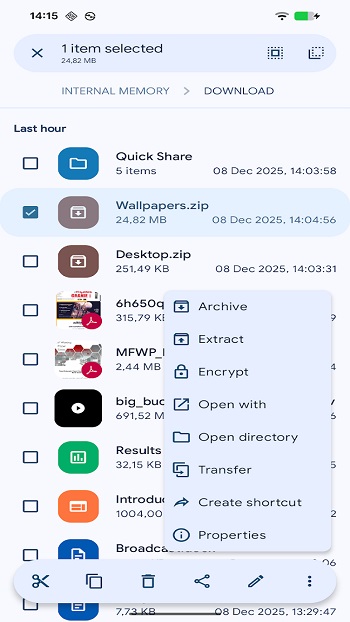
Security is another important part of the app. It includes options to protect sensitive files with encryption or restricted access. This is helpful if your phone contains personal documents, private photos, or work-related data. You can keep those files separate from regular storage without needing extra apps.
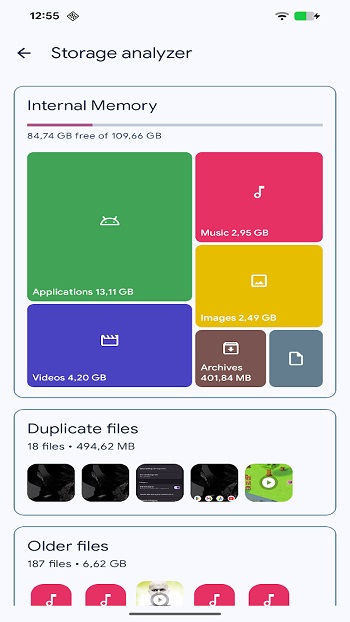
There are also built-in tools for handling compressed files like ZIP or RAR. You can open, extract, or create archives directly inside the app. Along with that, a storage analyzer helps you see which files are taking up space, making it easier to clean up your device without guessing what to delete.
That said, the app may feel slightly complex for beginners at first. The number of features can take a bit of time to understand. Some advanced options, like network connections or root access, are mainly useful for experienced users. Still, basic file tasks remain simple once you get familiar with the interface.
This app suits a wide range of users. It works well for students managing documents, content creators organizing media files, or anyone dealing with limited storage space. It’s especially useful when your phone starts feeling cluttered and you need a clear way to regain control.
FAQs Solid Explorer File Manager
What is Solid Explorer File Manager?
+
It is an Android file management app that helps users organize, move, and control files across local storage, cloud services, and network locations.
Is Solid Explorer suitable for beginners?
+
Yes, basic features like file browsing and moving files are easy to use, though advanced tools may take some time to learn.
Can Solid Explorer access cloud storage?
+
Yes, it supports services like Google Drive, Dropbox, and other remote storage options within a single interface.
Does Solid Explorer support file compression?
+
Yes, it can open and create archive files such as ZIP and RAR without needing extra apps.
Is Solid Explorer safe for private files?
+
It includes encryption and secure folder options, allowing users to protect sensitive data on their device.
Discover More Interesting Apps
-
 Mod
Mod
Claude AI
v1.261023.20
44.00 Mb
Updated -
Mod
Grok 3
v1.2.50-release.00
53.82 Mb
Updated -
Grok
v1.2.50-release.00
53.82 Mb
Updated -
Mod
Perplexity
v2.101.0
154.59 Mb
Updated -
DeepSeek
v2.7.1
25.54 Mb
Updated -
BLOApp
v9.80
55.47 Mb
Updated -
Mod
Speechify
v6.4.0
105.92 Mb
Updated -
Mod
Ostrich VPN
v3.9.1(440)
48.00 Mb
Updated -
DuckDuckGo
v5.299.0
75.70 Mb
Updated -
Mod
Todoist
vv12322
47.63 Mb
Updated









Share Your Thoughts